Release Date: 21 January 2026
Version 6.3
Introducing ThingsRecon Version 6.3
Version 6.3 focuses on helping users prioritize remediation efforts by transforming large volumes of security data into clear, actionable guidance. This release introduces a new Findings View, enhanced prioritization workflows, and reporting improvements designed to strengthen overall security posture and accelerate decision-making.
The Problem Today:
Security and risk teams are often faced with:
The same issue repeated across multiple assets
Long, flat lists with limited prioritization
High data volume but low clarity on what truly matters
The Outcome with Findings:
Repeated issues are consolidated into a single, meaningful finding
Risk is scored and ranked, not just reported
Users are guided to the issues that answer the “so what?” question
A single view shows where the same issue affects multiple discovered things
This enables faster, more confident remediation decisions.

Priorities Widget:
The Priorities Widget on the dashboard provides a high-level overview of the most important things to look at, based on severity, frequency, and impact.
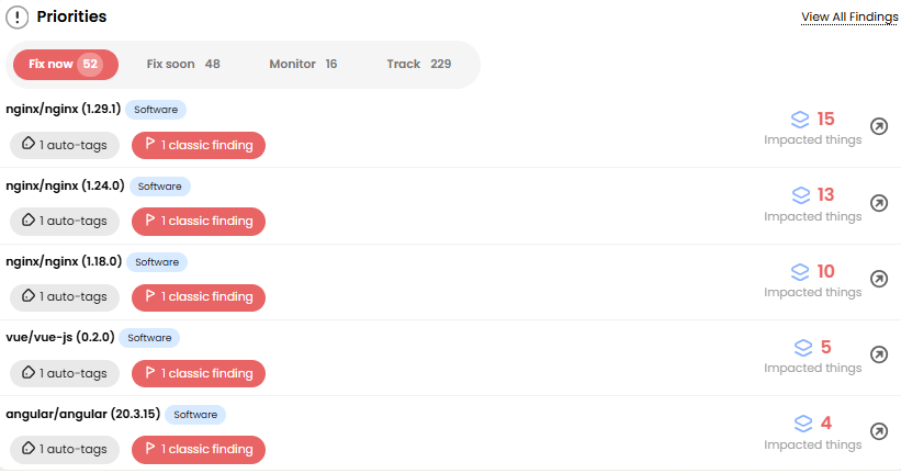
For each thing, the widget displays:
Thing name
Thing type
Number of auto-tags
Number of findings
Number of impacted things
Clicking the arrow next to Impacted Things opens a detailed view:
Auto-Tags: Displays the auto-tags affecting the thing; discovery or cyber-hygiene types
Findings: Shows the finding type and source
Expanding the source (using the arrow) reveals the finding description, evidence, and recommended solution
Impacted Things: Lists all affected applications, domains, IPs, certificates, and other assets.
Findings View (formerly “Issues”):
What It Does
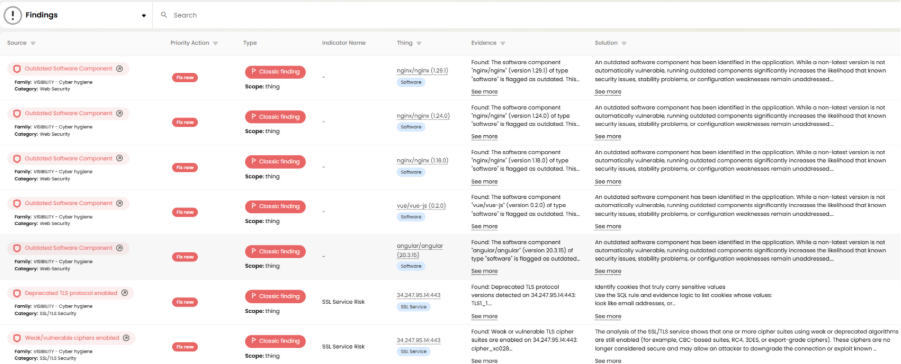
The new Findings View consolidates and prioritizes security issues to help users focus on what matters most.
Findings:
Shows things affected by cyber hygiene auto-tags, sorted by priorities.
Each finding has its own risk weight, based on cyber hygiene references
Applies a proprietary risk-scoring mechanism to determine priorities
Ranks findings from highest to lowest priority, clearly indicating where action is required first
This approach moves users beyond raw detections and toward understanding real-world risk.
How It Works (High Level)
1. Aggregation
Related instances of the same thing are grouped across the environment.
2. Scoring
Each aggregated finding is evaluated using a proprietary scoring model that considers:
Frequency of occurrence
Asset importance and exposure
Potential business and security impact
3. Ranking & Display
Things are presented in priority order, from highest to lowest risk, making it immediately clear where to act first.
In this release, all findings are of type Classic, based on ThingsRecon auto thing tags.
Future releases will introduce Smart and Power findings, based on additional advanced intelligence sources.
Priority Actions & Filtering
A new Priority Actions column has been added to the Findings table. This dedicated, filterable column includes:
Fix Now
Fix Soon
Monitor
Track
Each action corresponds to a defined priority-weight range.
Users can also filter on the Things column to focus on specific areas such as domains, applications, certificates, IPs, and more.
Priorities Report:
A new Priorities option is available when creating an Excel report template.
Users only need to provide a report name, and the generated Excel file contains four dedicated sheets:
Fix Now
Fix Soon
Monitor
Track
This enables easy sharing and offline review of prioritized remediation actions.
Discovery & Hygiene Indicator Updates
To align with the new Priorities and Findings framework, indicators have been adjusted to clearly show where they do and do not impact specific Thing Types, improving prioritization accuracy.
EOL Auto Thing Tags
Label | Thing Type |
Low Risk Deprecated SSL Configuration | Application |
Moderate Risk Deprecated SSL Configuration | Application |
High Risk Deprecated SSL Configuration | Application |
Low Risk SSL Protocol Detected | Application |
Moderate Risk SSL Protocol Detected | Application |
High Risk SSL Protocol Detected | Application |
Invalid SSL Certificate | Application |
Outdated Components | Application |
Dangling DNS | Application |
New Auto Thing Tags
Label | Thing Type |
Dangling CNAME / DNS | DNS record |
Outdated Software Component | Software Component |
Hostname Certificate Mismatch | Application |
Missing CRL Distribution Points | Certificate |
Auto Thing Tags covering those that were removed
Label | Thing Type |
Weak Certificate Key | Certificate |
Revoked Certificate | Certificate |
Expired Certificate | Certificate |
Expiring Certificate | Certificate |
Self-Signed Certificate | Certificate |
Deprecated Signature Algorithm | Certificate |
Deprecated TLS protocol enabled | SSL service |
TLS 1.2 with CBC cipher | SSL service |
Weak/vulnerable ciphers enabled | SSL service |
Missing Modern Strong Ciphers | SSL service |
ALPN Misconfiguration | SSL service |
Missing TLS 1.3 | SSL service |
Too Many Accepted Ciphers | SSL service |
UI Usability Improvements:
New Export Option
Export functionality has been added to the work queue table, enabling easier reporting, actioning and offline analysis.
Blacklisted Company Names
Users now have the ability to exclude domains from deep discovery scans, based on company names. This is set in Test Scan Parameters.
Bug Fixes & Minor Improvements:
This release also includes:
General UI refinements
Was this article helpful?
That’s Great!
Thank you for your feedback
Sorry! We couldn't be helpful
Thank you for your feedback
Feedback sent
We appreciate your effort and will try to fix the article