Release Date: 21 September 2025
New Feature: Issues
Introducing Issues, a new way to streamline remediation efforts and improve focus on cyber hygiene.
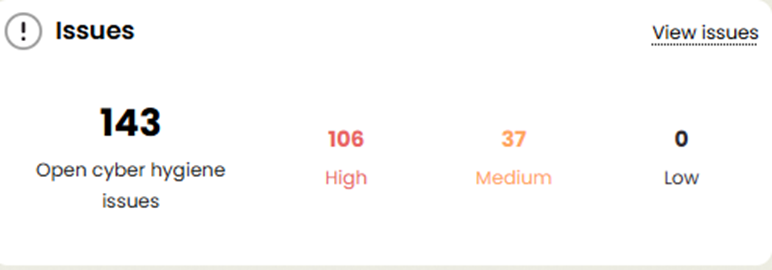
- Issues Widget
- A dedicated widget highlights cyber hygiene issues.
- Clicking “View Issues” takes you directly to the new Issues page.
- Issues Page
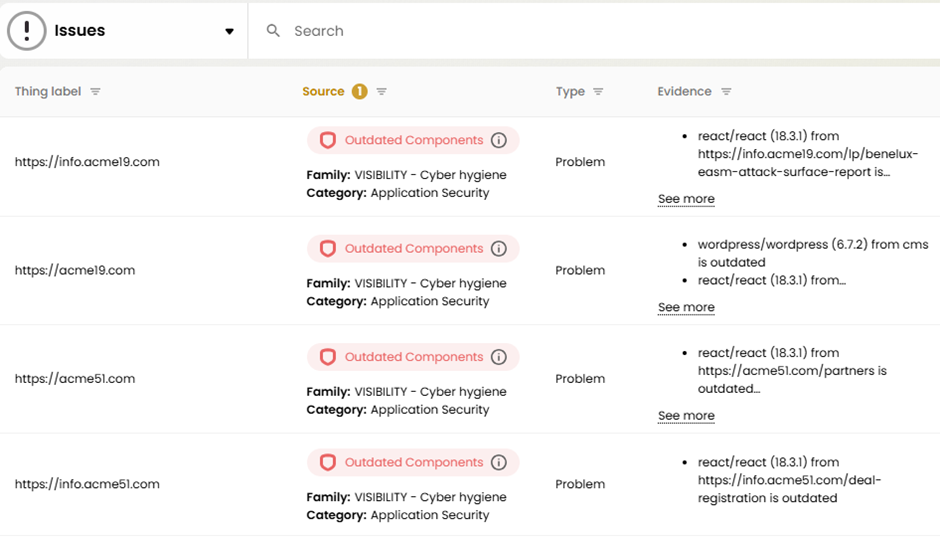
- Displays all issues filtered by the selected thing type.
- Columns include:
- Thing Label
- Source
- Type
- Evidence
- Solution
- Issues Tab in Things Table
- A new “Issues” tab now lists all issues with detailed context, including both:
- Problems
- Recommendations
- Issues combine both automatic and user-defined tags for easier prioritization.

- A new “Issues” tab now lists all issues with detailed context, including both:
New "Thing": DNS Record
- DNS Record has been introduced as a new thing type.
- Accessible from the Things widget on the dashboard and the Things dropdown list.
- All DNS record types (previously tied to Applications, Domains, etc.) are now grouped under DNS Record, while still visible in their original contexts where relevant.
UX Improvements
Tags
What was previously called Visibility tags and User Tags have been improved in this version:
- User Tags: tags created by users
- Visibility Discover Tags: automated informative tags
- Visibility CyberHygiene Tags: automated hygiene tags
Back Office Enhancements
Previously, Visibility Tags were hardcoded in the scanner.
In this release;
Automated tags are now called Auto Thing Tags in the back office.
Auto Thing Tags are fully configurable from back office.
Auto Thing Tags can be created for any type of thing.
Reports
- Report Templates have been rebranded to align with the latest ThingsRecon branding guidelines.
Thing Profile
- The Visibility box has been redesigned as Tags, now split into four sections:
- Visibility – Cyber Hygiene
- Recommendations
- Visibility – Discovery
- User Tags
- Each tag now includes an information (i) button, which opens a pop-up with issue descriptions and solutions.
- For quick reference, the top 2–4 tags are displayed in each category.
- The Network and Software Components sections are now displayed in separate boxes for a more consistent layout.
Bug Fixes & Minor Improvements
This release also includes numerous bug fixes, performance enhancements, and stability improvements to ensure a smoother user experience.
Was this article helpful?
That’s Great!
Thank you for your feedback
Sorry! We couldn't be helpful
Thank you for your feedback
Feedback sent
We appreciate your effort and will try to fix the article